AxBIC for Business Owners
Ask your business anything in plain English, and get the answer from your own ERP data in seconds. No report requests, no spreadsheets, no waiting.
You want the benefits of AI, but you don't want your financial data sent to a public AI service. AxBIC (Axsapt Business Intelligence Companion) solves that. It connects to your ERP or SQL database, and your data never leaves your server.
And you don't have to work out the reports on your own. Your ERP consultant knows your system and your data, and helps turn your questions into the reports and dashboards your business runs on.
What AxBIC is
AxBIC is an AI analytics tool that sits on top of your ERP or SQL database and answers questions asked in everyday language. Ask your data anything. It never leaves your server.
- Plain-English questions. Type "which customers bought less this quarter than last?" and get the answer. No need to know a table name or write a report.
- Your data stays with you. AxBIC runs inside your own environment. Nothing is sent to a public AI service.
- Works with the ERP you already have. AxBIC supports ABM, Sybiz, Sage X3, SAP Business One, MYOB Evo and Acumatica.
- Reports and dashboards. Good questions become multi-level reports, scheduled and emailed to your team, and dashboards you check every day.
AxBIC comes in two editions.
Edition | Best for | What's included |
|---|---|---|
Desktop | Your finance team or consultant building reports and dashboards | The full product |
Web | You and your managers, getting answers from any browser | A cut-down edition |
From a quick question to the report you actually need
You'll get answers on day one. The real value comes from asking the right questions, and that's where expert help pays for itself.
You ask, "How are sales going?" What you really want is sales by region, by rep and by product group, against budget and last year, with margin, in your inbox every Monday at 7am. AxBIC gets you there faster, with help from someone who knows both your business and your data.
Sharper questions
Your Axsapt Support helps turn a vague concern into a precise report your management team can act on.
Numbers you can trust
Axsapt knows where your ERP stores what, which fields are reliable, and where the traps are, such as credit notes, inter-company transactions and back-dated postings.
Built around your business
Axsapt already know your processes, your people and your pain points, so your reports reflect how you actually run.
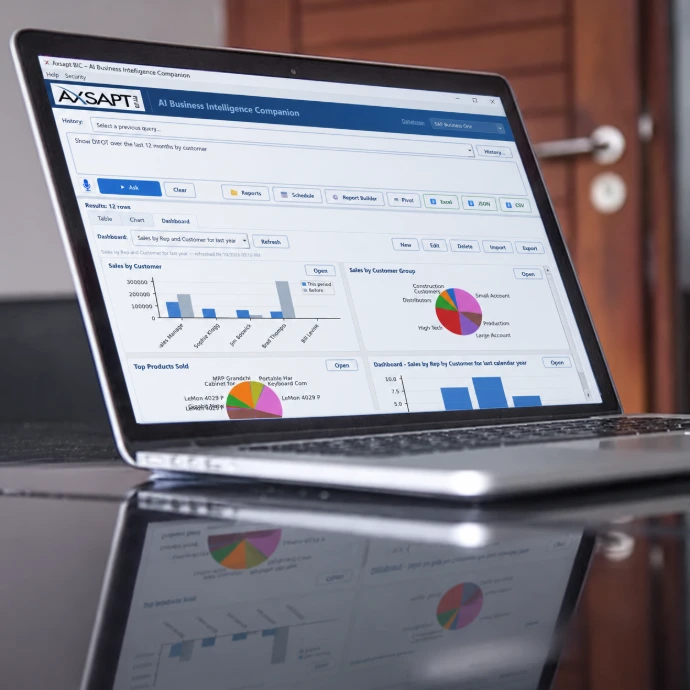
Desktop Edition
Installed on your server and connected to your databases. Your finance team or consultant uses it to test questions, build scheduled email reports, and design the dashboards you see in the Browser Edition and Dashboard Viewer.

Browser Edition
Runs in any browser. Your data isn't sent to AI and isn't stored on the device, and it travels encrypted directly from your own server. Run your reports and check your dashboards from anywhere.

Dashboard Viewer
A report that used to take days of IT or consultant time can now be drafted in a single conversation. That means faster answers for you and lower cost to get them.
What AxBIC can do for your business
Start with a quick setup and grow into the reporting your business has always needed.
What you need | What you get |
|---|---|
Up and running quickly | AxBIC installed on your server, connected to your ERP, and your users set up |
Clarity on what to measure | A workshop with you and your managers to turn your concerns into clear questions |
A Management report pack | Multi-level reports with subtotals and comparisons, built from those questions |
Reports without chasing | Reports emailed automatically to the right people at the right time |
The business at a glance | Dashboards for you, your finance team and your operations team |
Money you didn't know you were losing | Reviews that find slow stock, margin leaks, debtor problems and bottlenecks |
A team that can help itself | Training so your staff ask good questions and read the answers critically |
Reporting that keeps up | Regular reviews as your business changes: new reports, dashboards and questions. Dashboards are especially useful after any change, such as a new process, a stock clean-up or a new module. A dashboard that tracks the result shows you whether the change worked. |
What your business gets
- Answers in minutes instead of waiting on a report request
- AI you can use with confidence, because your data stays on your own server
- Reports designed by someone who knows your business
- Scheduled reports that arrive without anyone having to remember
- Dashboards that show the health of the business at a glance
- More value from the ERP you've already paid for
Is AxBIC right for your business?
AxBIC is a good fit if any of these sound familiar:
- You regularly ask your team or consultant for one-off reports or data extracts.
- Month-end reporting depends on one person and a set of spreadsheets.
- You're interested in AI but worried about data security.
- Your ERP is stable and you want to get more out of it.
- The business has grown and you can no longer see everything by walking the floor.
- You've just made a change and want to measure the result.
Common questions
Can we trust the answers? Treat AxBIC like a capable new analyst: fast, but worth checking on anything important. That's why the reports your business relies on are designed and validated by someone who knows your data.
We already have reports in our ERP. Standard reports answer the questions your software vendor expected. AxBIC answers the question you have today, and the useful ones become scheduled reports.
Will my staff need training? A little. Anyone can type a question, and a short training session shows your team how to ask good ones and read the answers critically.
What does it cost? The Desktop Edition is priced at $100 each month for a minimum 5 users, The Web Edition is $100 each month for each user, the Report Writer and Scheduled Reports is $100 each month and the Dashboard is $100 for each installed screen/computer each month. For our Foundation Subscribers the special pricing is $250 each month for 5 users and includes the following modules: Desktop, Web, Reports and Scheduler. Additional users are available at 50% discount for Foundation Subscribers.
Next steps
The fastest way to judge AxBIC is to see it answer questions about your own business.
- Book a demonstration, ideally on a copy of your own database.
- Bring three or four questions you've always wanted answered.
- Watch AxBIC answer them, then decide what's worth turning into reports and dashboards.